The teleprompter built
for live musicians
Your whole song library on every device, with lyrics that scroll on their own while you play. Nothing to set up, works with no signal, and your whole band can follow the same song.
Everything you need on stage
Built for real gigs. Every feature, one screen.


Scroll that listens to you
QMe listens to your voice and advances the lyrics automatically, completely hands-free. No tapping, no foot pedal needed, just sing.
Three scroll modes: Voice Follow listens to your singing, BPM Auto-Scroll locks to your tempo, and Foot Pedal gives you manual control with any Bluetooth pedal.
Set the tempo, scroll speed, key and text size on a song once and they stay with it, on every device you sign into. Loop a section to drill the part you keep missing, and keep your own notes on any song.
Playing with a band? For the most accurate voice follow, run a dedicated dry aux send of the vocal mic from your mixer into the iPad, so QMe hears only the singer.
Read the guide: Teleprompter · Foot pedals · Watch the video
Capture every performance
Record audio or video during practice or performance. Switch between front camera (performer view) or rear camera (audience view). Lyrics overlay included.
Read the guide: Recording takes · Watch the video
Put the words on the big screen
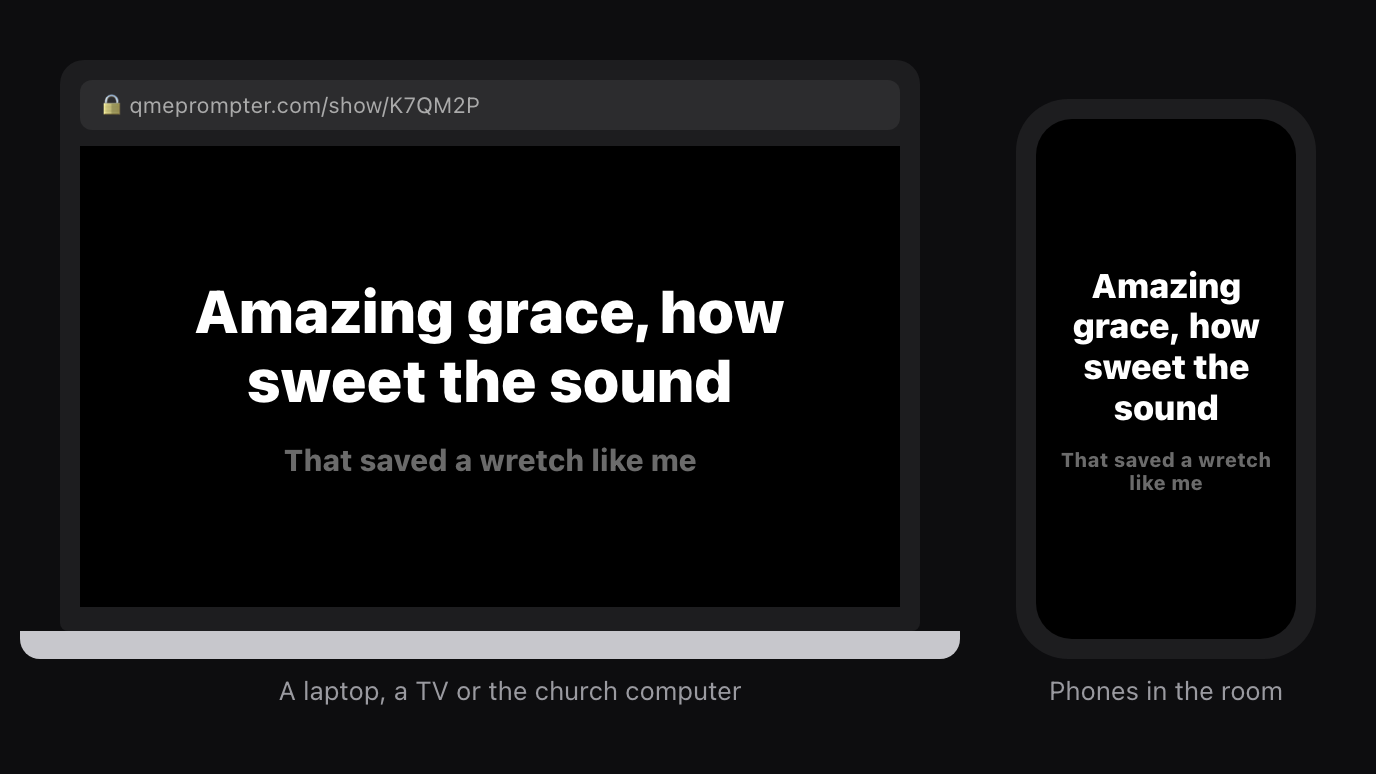
Audience View shows the room what to sing: one line at a time, big, with the next line underneath. No chords, no controls, just the words.
Open a link on a TV, a laptop or the church computer, or let people scan a QR code and follow on their phones. Add it to OBS for Zoom and livestreams. Or AirPlay to an Apple TV or a Mac and the words light up as you sing them.
Read the guide: Audience View
Your whole band, in sync
Share a 6-digit code and every band member's screen syncs instantly, same song, same line, same scroll. In the same room or across the country.
The host controls everything. Bandmates follow live with near-zero latency over WiFi.
Nobody gets left out for having the wrong phone. A bandmate on Android, an old tablet or a laptop just opens qmeprompter.com in their browser, enters your code, and reads along in time with you. No app to install, no subscription, and they cannot accidentally scroll your set because the web follower only reads the session.
Read the guide: Jam Mode · Watch the video
Run the jam from one screen
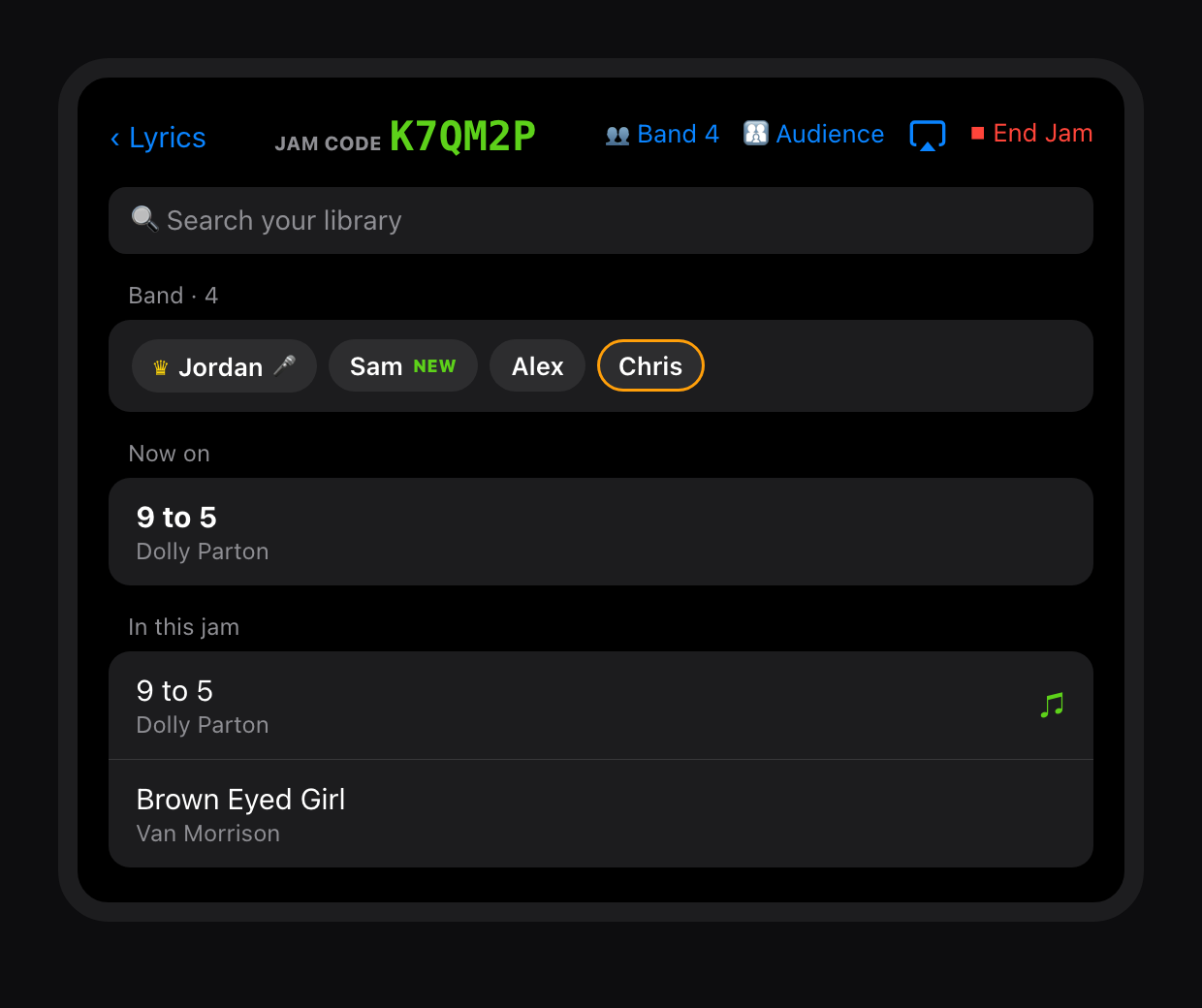
Jam home keeps the band connected between songs. Search your whole library and tap a song: it joins the jam and every screen switches to it. No loading the set before you start.
The join code sits big and green at the top. See who is in, who is singing and who just joined, send the music to the room's speakers with AirPlay, and end the jam only when you mean to.
Read the guide: Jam Mode
The music on the room's speakers
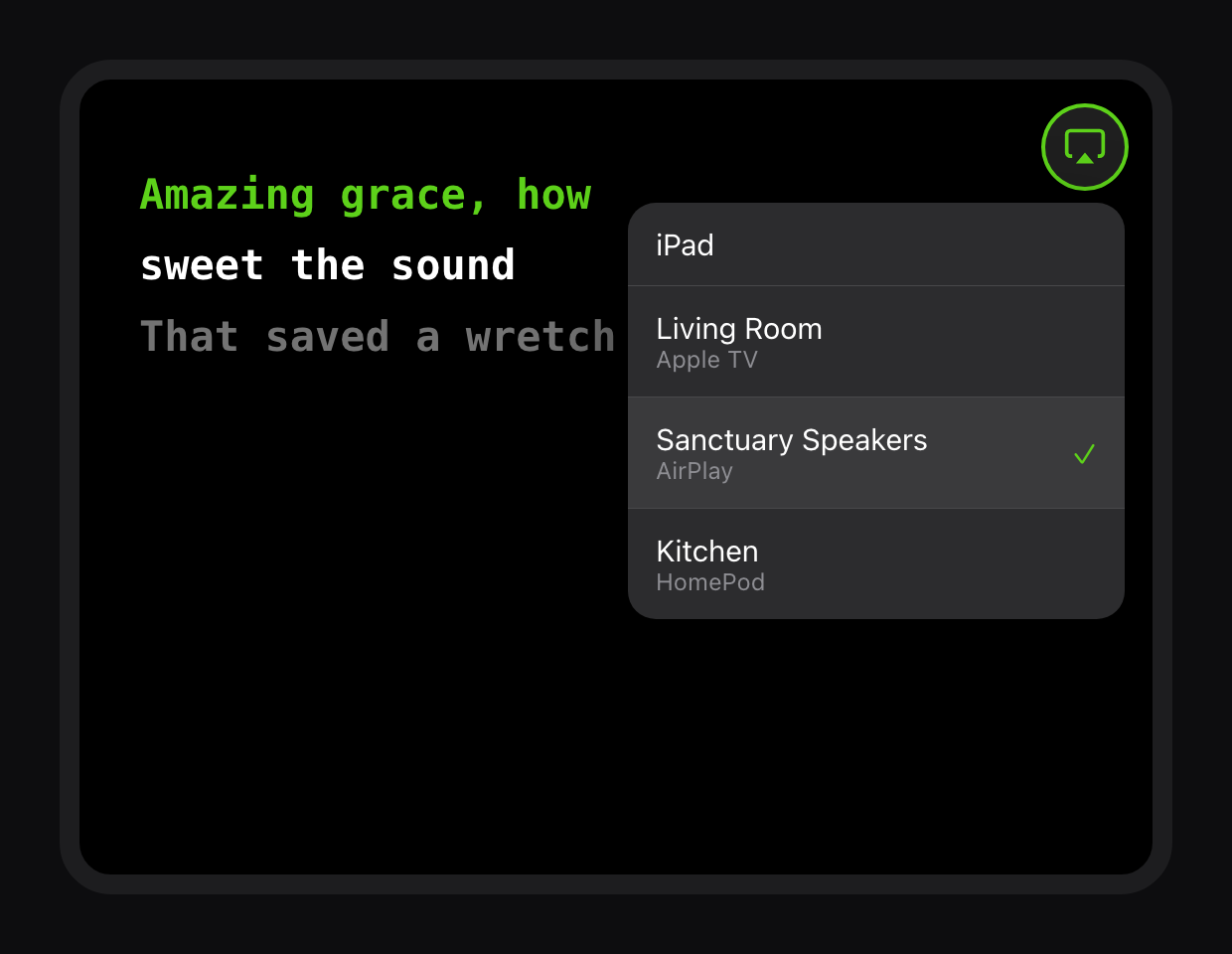
Every song now has an AirPlay button in the top-right corner. One tap and your backing track, click or Apple Music plays on a speaker, a HomePod, an Apple TV or a Mac, while the words stay on your iPad.
Pair it with Audience View and the words and the music come from the same place, right in front of the people singing.
Read the guide: AirPlay and Audience View
Lyrics on your lens,
look up, not down
QMe integrates with Even Realities G2 smart glasses to push your lyrics and chords directly to your HUD. See the current line, next line, and chord changes, right in your field of vision while you perform.
No more glancing down at a stand. No more breaking eye contact with the audience. The lyrics come to you.
Run your whole setlist from the glasses. Not just one song. Move through a set song by song from your phone, from a tap on the glasses, or by browsing your setlists on the lens itself, with the whole set cached so it keeps working if the venue wifi drops.
Display glasses work too, over a cable. XREAL, Viture, RayNeo and Rokid connect straight to your iPad or iPhone with a single USB-C lead. QMe gives them their own full-size lyric view, chords above the words, while every control stays in your hands. No pairing, no account, no app to install, and nothing travelling over wifi or bluetooth, so there is nothing to drop out mid-set.
Read the guide: How to get lyrics on smart glasses · G2 manual · Display glasses on a cable · Watch the video


Organize your whole show
Build setlists with drag-to-reorder, tag songs with key and BPM, and launch your entire show from one screen. Album art auto-fetches from Apple Music.
Now manage your setlists from any Mac or PC using the QMe Web Console. Build your set with a full keyboard and it is on your iPad before you get to the gig. Your library lives in your QMe account, so there is no Dropbox to connect, no Google Drive to log into, and nothing to sync by hand.
Read the guide: Setlists · Apple Watch · Watch the video
Learn it with the record
Link a song to Apple Music and press play. The actual recording plays while your lyrics and chords follow it, line by line, locked to the track. Not a guess at the tempo, the real song.
That is what makes it a practice tool. Learning a new number, you hear the original and read the chart at the same time, and the words are always where the singer is. Loop the bridge you keep fluffing and the music loops with you. Mark where each section starts and QMe holds the lyrics still through a long intro instead of scrolling away before anyone sings.
On the night, the same link means the lyrics cannot drift. Prefer your own audio? Drop in any file from your device. Each track stays tied to its song and works offline once it is saved.
Organize by gig.
Import in seconds.
Create Books, Acoustic Set, Wedding Gigs, Church Songs, Classic Rock Night, and drop any song into multiple books at once. Browse your whole repertoire, filtered exactly the way you think about gigs.
Already have a library somewhere else? Bring it with you. Import a SongBook Pro backup, ChordPro files, PDFs, plain text, or even a photo of a chord sheet. AI Clean Up turns a messy import into a proper chord-over-lyrics chart.
New, on the web: Back up and move your whole catalog from the QMe Web Console at qmeprompter.com. Export every song to standard ChordPro (one file per song or a single archive), and import ChordPro files straight into your library. Your songs stay portable, so you always have a clean way in and out.
Import your backup. Be gig-ready in minutes.
Bring your whole rig across in one drop. Upload your SongBook Pro backup and QMe imports your songs, your chords, and all your MIDI, your rig changes, tempos, and drum settings, together in one step. No renaming, no scripts, no manual re-entry.
See how the SongBook Pro import works → · Coming from OnSong? · Worship team on Planning Center?
Your rig follows your setlist
Connect a MIDI keyboard or pedalboard over Bluetooth and QMe switches your sounds for you. Set one patch for a whole song, or a different sound for every section, and let it change automatically as you play.
No more reaching for your keyboard mid-song. Tap once in the teleprompter to fire a song's setup, or let setlists send the right sound as each song begins. Use MIDI Learn to capture any control instead of typing numbers.
It works the other way too. Drive QMe from a Morningstar MC8, a Behringer FCB1010, or any board that sends Control Change. Learn any of six actions to your own buttons, on any MIDI channel, and use a Bluetooth pedal at the same time without reprogramming anything.
Read the guide: MIDI · Foot pedals · Watch the video
Annotate your charts
Mark up chord sheets and tab with Apple Pencil. Add notes, circle chord changes, highlight cues, annotations stay locked to your lyrics permanently.
Built-in chord diagram library, tab sheet builder, and PDF export. Great for teaching or sharing with your band.
Read the guide: Apple Pencil & tab sheets
Edit lyrics or get AI help
Update and edit your songs with a full chord-based lyric editor. Or use the built-in AI assistant to write a chorus, add a bridge, generate verse ideas, all based on your song's style.
Supports ChordPro import, plain text paste, and full manual editing.
Built-in guitar & bass tuner
Precision chromatic tuner always one tap away. Guitar, Bass, all strings at a glance. Alternate tunings, 4-5 string bass, all-string view. Drum tuner with lug-by-lug tension and genre presets also built in.
Read the guide: Tuners & metronome · Watch the video
Simple, affordable
Start free. Upgrade when you're ready to perform.
- Up to 3 songs
- Voice-follow scroll
- BPM auto-scroll
- Foot pedal support
- Guitar & bass tuner
- Unlimited songs
- Song library & books
- Bulk import (SongBook Pro, ChordPro)
- Jam Mode band sync
- Smart glasses support
- Apple Watch app
- Apple Music sync
- Backing tracks
- MIDI device control
- Apple Pencil annotation
- Performance recording
- Web Console access
- Drum tuner
- AI lyric assistant
Cancel anytime. Free trial available.
What musicians say
Common questions
Your set. Your way.
Never lose your place again.
Download free on iPhone and iPad.