How does a teleprompter that follows your voice work?
A voice-following teleprompter listens to you sing, matches the words it hears against the lyrics on screen, and scrolls so the line you are singing stays in front of you. Stop singing and it waits. QMe Prompter does this on the iPad and iPhone; here is what it takes to make it reliable on a real stage.
Why you would want it
Every other scroll method makes an assumption. Tempo scroll assumes the song is the same length every night. A pedal assumes you have a free foot at the right moment. Voice Follow assumes nothing: it goes where you go. Stretch the intro, repeat the chorus because the room is singing, stop to talk, and the words are still where they should be when you come back in.
What is happening while you sing
The app listens through the microphone, recognises the words, and looks for them in the lyrics near where you are. When it finds a match it moves the highlight and scrolls the page to keep you centred. It expects you to sing the song roughly in order, so a repeated chorus or a skipped verse is handled by looking a little ahead and behind rather than across the whole song. When you stop, nothing moves.
Two things follow from that. It needs to hear mainly you, not the whole band. And it needs to know what language you are singing in.
The mic setup that makes it accurate
The iPad's built-in microphone hears the whole stage: kick drum, guitar amp, monitors, crowd. Solo at home it works straight away. With a band, the fix is the same one sound engineers use for everything else: give the app a clean vocal signal.
- Take an aux send from the boardPost-gate, pre-effects, vocal mic only. Dry.
- Run it into the iPadThrough a USB-C or Lightning audio interface. Any small two-channel interface will do.
- Check the levelQMe shows a level meter under Mic Level in the song settings, and offers the check whenever a new mic is plugged in. Sing a line; the meter should peak around two thirds.
A band setup, step by step
Here is one way to do it with a small mixer and a two-channel USB interface (a Zoom AMS-22 in the picture; any similar interface works the same way).
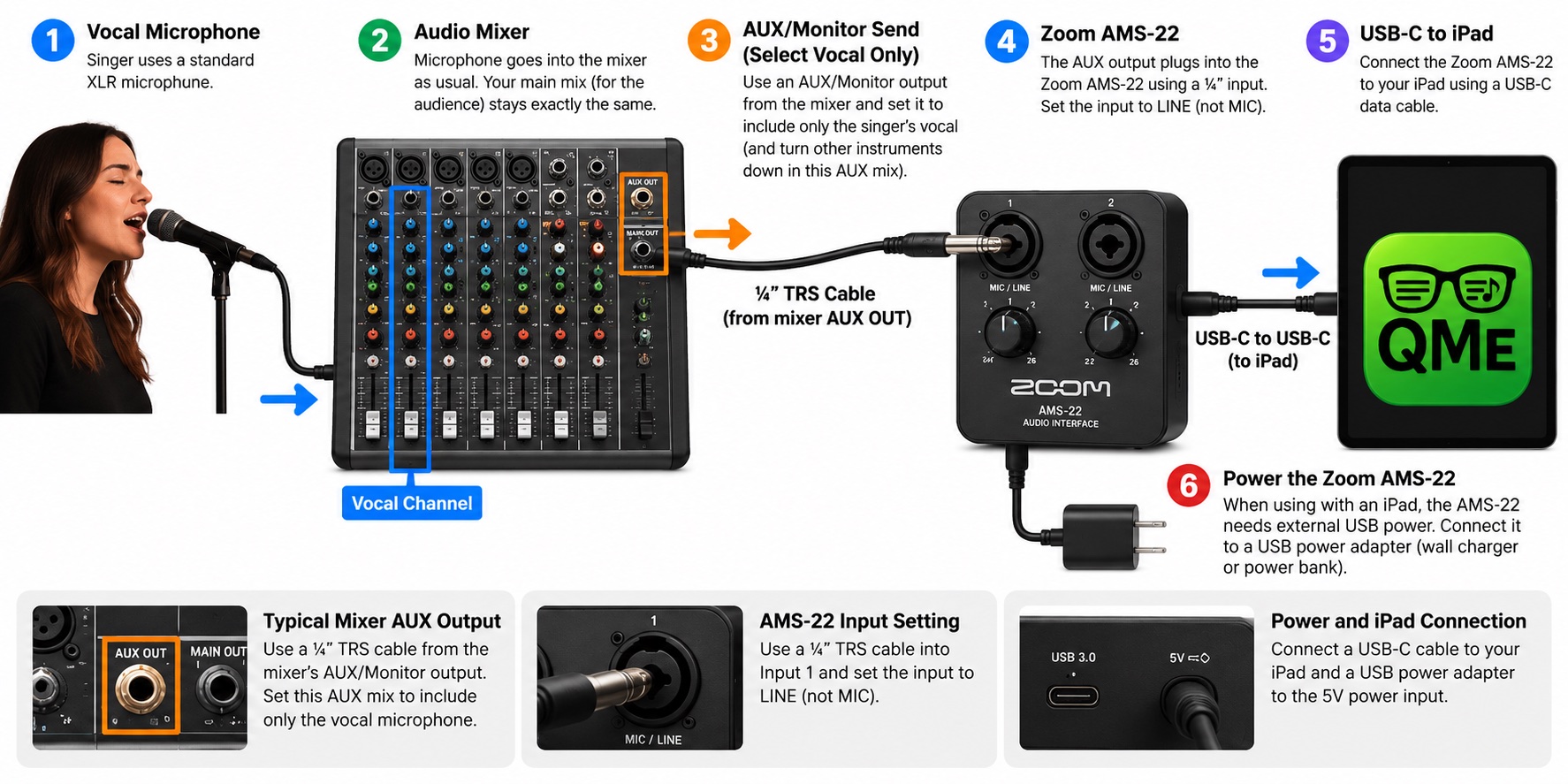
- Mic into the board as usualThe singer's mic goes into its channel like always. The main mix for the audience does not change at all.
- Make an aux mix of the vocal onlyPick a spare AUX or monitor send and turn up only the vocal channel in it. Everything else in that aux stays down. Keep it dry: no reverb or delay.
- Aux out to the interfaceA quarter-inch TRS cable from the board's AUX OUT into input 1 of the interface. Set that input to LINE, not MIC.
- Interface to the iPadA USB-C data cable from the interface to the iPad. Many interfaces, the AMS-22 included, also need USB power when used with an iPad: plug a wall charger or power bank into the interface's 5V port.
- Check it in QMeOpen a song, go to the song settings, and look at Mic Level. The meter should move when the singer sings and stay still when the band plays without them. Then choose Voice Follow and press play.
If the meter jumps with the drums, something other than the vocal is in that aux. Check the send knobs on the other channels.
Mixer with USB? You may not need the interface
Many newer mixers can plug straight into the iPad over USB and act as the audio interface themselves. Whether that helps depends on what the mixer sends over USB:
- Every channel, or a chosen aux, over USB: this works. Most digital mixers do it (Behringer X Air, TASCAM Model, Zoom LiveTrak and PreSonus StudioLive, for example). Route the vocal, dry, to USB channel 1, since that is the one QMe listens to, and skip the separate interface.
- Only the main stereo mix over USB: many small analog mixers with a USB port work this way. That feed is the whole band, which is exactly what Voice Follow should not hear. Use the aux-and-interface setup above instead.
Two more things to check in the mixer's manual: it should say it works with iPad (sometimes called class compliant, meaning no driver needed), and you may need a USB-C to USB-B cable for a mixer with a square USB port. Then check Mic Level in QMe exactly as above: it should move with the singer and stay still when the band plays without them.
No aux available? A small headset or boom mic on the singer, wired into the iPad, gets most of the way there. The Instrument Filter in QMe cuts the low end so an acoustic guitar next to the mic bothers it less. On a very loud stage with no clean feed, tempo scroll or a pedal is the honest fallback, and QMe lets you pick that per song.
Languages
Recognition is language-specific. QMe follows songs in English, Spanish, Portuguese, French, German and Italian. It reads the lyrics and picks the language on its own, or you set it per song in the editor. A Portuguese song followed by an English recogniser barely moves, which is why this matters.
Where it falls short, honestly
- Long instrumental passages. Nothing is sung, so nothing moves. Mark your sections and the app holds the words in place, then picks up when you come back in.
- Heavy harmony or screaming. The recogniser wants words it can make out. Clean lead vocals work best.
- A dirty signal. If the app hears the drummer as loudly as the singer, no amount of cleverness fixes that. The aux send is the answer.
- Japanese and other languages without word spacing are not supported yet.
It is one of three modes, not the only one
QMe gives every song three ways to scroll: Voice Follow, auto scroll at the song's tempo, and a foot pedal or Apple Watch. The setting is saved per song, so a ballad you sing can follow your voice while an instrumental runs on tempo. See the teleprompter manual for the details of each.
Questions musicians ask
Does voice follow need an internet connection?
No. Once the song is on the device the recognition runs without a network. Group Jam, which syncs the band, is the only feature that needs Wi-Fi.
Will it follow me with a full band playing?
Yes, with a clean vocal feed: a dry aux send of the vocal mic from the board into the iPad through an audio interface. With only the iPad's mic on a loud stage, use the Instrument Filter, or switch that song to tempo scroll or pedal.
What happens if I skip a verse or repeat a chorus?
It looks a little ahead and behind where you are, so a repeated chorus or a skipped verse is picked up. Jumping to a completely different part of the song is a tap on the section strip.
Which languages does it understand?
English, Spanish, Portuguese, French, German and Italian, chosen automatically from the lyrics or set per song.
Related: Perform your Suno songs live · Best teleprompter app for musicians · Teleprompter manual · Foot pedals · Lyrics on smart glasses
Try it on your next rehearsal
QMe is free to download, and a new account gets 30 days of full access with no card required.
Download QMe PrompteriPhone and iPad. Build your library on a real keyboard at qmeprompter.com.